Dev Stack
Abstract
The Iterative Website Development Stack outlines a process for building and launching websites, typically involving iteration and collaboration between development and design teams.
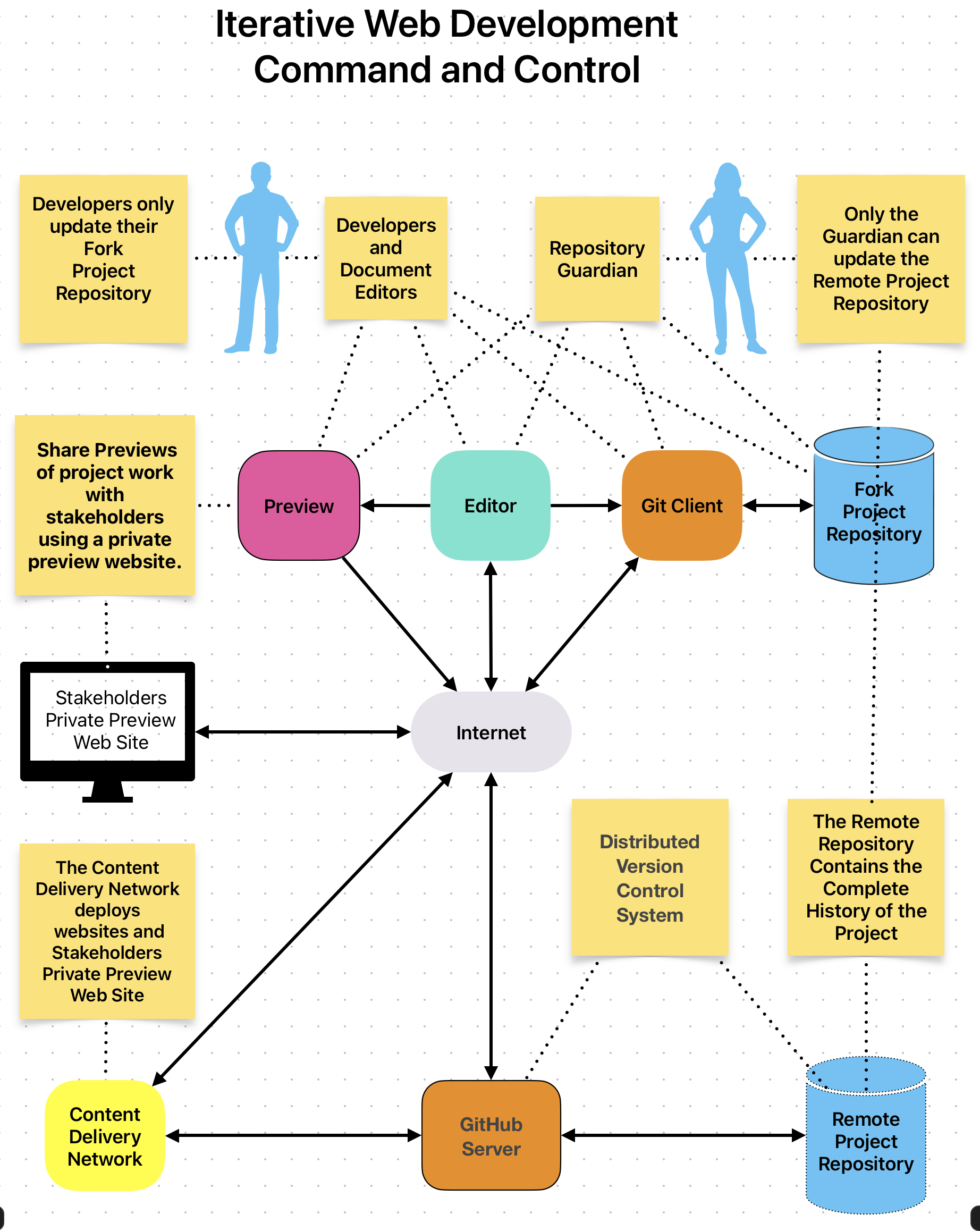
The iterative website development process uses core technologies:
-
Visual Studio Code is Team member's use thier Developers Integrated Development Environment (IDE) for developing documentation and software
-
Git is the most widely used modern version control system in the world today
-
GitHub hosts the Team members repositories and Reomte Projet Repository
-
MkDocs static Site Generator is used to create local, private, and production websites
-
Content Delivery Network is used to create local and Stakeholders Private Preview Website, and deploy the production website.
Each team member has a GitHub account and clone a copy fo the Central Project Repository to their workstation
Changes made to the cloned repositories cannot directly affect the central repository, which is managed by a gatekeeper team member. It requires a Pull Request Review This helps maintain a unified source of truth for project history and files.
-
Developers use Visual Studio Code as their development environment
-
Developers using Mkdocs to create Private Websites Preview for stakeholders.
-
Developers commit their changes to the central website repository
-
Developers request a GitHub Pull Request to merge their repository with the central project repository.
-
Pull requests approved by the project gatekeeper are incorporated into the central repository
-
Developers use pull to update their local repositories.
-
A production website is created by the project gatekeeper when the stakeholders agree
Read About version control and Git
GitHub
GitHub is a Distributed Version Control Systems enabling multiple teams to work separately on the same project without having an impact on the work of others. GitHub manages an online web hosted Central Website Repository containing all project files. It is a unified source of truth. It helps teams collaborate and maintain the entire history of project file changes, and helps answer the questions who changed what, where, when, and why for the lifetime of the project
The core technology of Iterative Development is Git, GitHub, a central website repository controlled by a project gatekeeper, and a CDN like Cloudflare which deploys Private Websites Preview, production sites and individual team member's private previews.
GitHub is a web-hosted VCS that helps teams collaborate on a project without affecting each other's work by having one central repository acting as the source of truth. Team members use the website dev stack to develop, deploy, and maintain sites using a central repository to avoid confusion/defects.
Team members fork a copy of the central repo to their GitHub account, then make a clone on workstations to make changes. They cannot directly make changes to the central repo and commit to their own repo clone. Stakeholders determine when changes are ready, then developers open PRs to the central repository, which the gatekeeper merges after team agreement. The central repo is deployed to the Internet after sufficient testing.
GitHub Central Repository.
Iterative website development in teams uses Git, GitHub, and a central repository controlled by the project gatekeeper. The team members use the website development stack to develop, deploy, and maintain websites. Team members make changes to their local repository clone, commit changes to their local repository, and may deploy their local repository to a Private Websites Preview to get stakeholder feedback. A GitHub pull request is made when stakeholders determine the changes are ready, which is examined and tested before being committed to the central Mkdocs repository by the gatekeeper. Developers then pull the central repository changes and commit them to their local repository copy of the central project. After sufficient development and testing iterations, the gatekeeper deploys the central project repository to the public internet.
GitHub Workflow
GitHub workflow uses the following steps for teams:
Fork central repo to personal GitHub account Clone the forked repo to workstation Create topic branch from cloned repo Make changes and commits on topic branch Push topic branch to forked repo in GitHub account Regularly pull from central repo to get updated develop branch Occasionally deploy to Private Websites Preview for stakeholder feedback Open a Pull Request on forked repo for integrating local changes to central repo Team discusses, approves, and updates the Pull Request.---
MkDocs Material - Static Site Generator
A Mkdocs static site generator tools are used to create the "Production Website" by the "CDN - Deploy Website to Web"